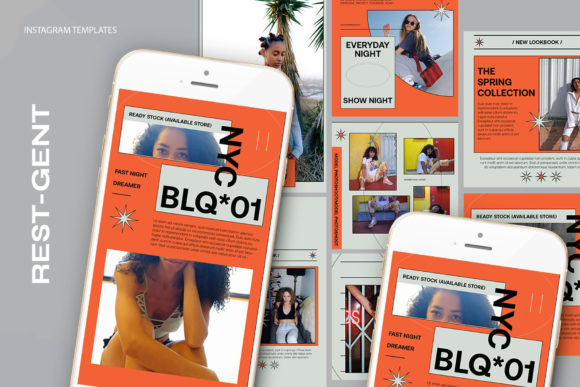
Streamlining Your Visual Workflow with Rest-Gent Instagram Templates
In the fast-paced ecosystem of digital marketing and personal branding, consistency is often the dividing line between an account that grows and one that stagnates. For professionals, entrepreneurs, and creators aged 20 to 50, time is the most scarce resource. The pressure to produce high-quality visual content daily can quickly lead to burnout or a decline in aesthetic standards. This is where strategic asset management comes into play. Rest-Gent Instagram Templates offers a structured solution designed to integrate seamlessly into existing creative workflows, allowing users to maintain a polished feed without reinventing the wheel for every post.
These templates are not merely static images; they are dynamic tools built on the robust foundation of Adobe Photoshop. By utilizing a .PSD file format, the package provides a level of flexibility and control that cloud-based drag-and-drop editors often lack. The core value proposition lies in its ability to decouple the design phase from the content creation phase. Instead of spending hours aligning text boxes, adjusting layer opacities, or worrying about color harmony during a busy workday, users can rely on a pre-engineered structure. This shifts the workflow from "designing from scratch" to "populating a framework," a subtle but powerful shift that significantly boosts productivity.
Technical Specifications and Quality Control
Before diving into the implementation process, it is crucial to understand the technical backbone of these assets. Professional output requires professional specifications, and Rest-Gent Instagram Templates adheres to industry standards. The files are delivered at 300 DPI (dots per inch). While screen display typically requires only 72 DPI, working at 300 DPI ensures that the graphics remain crisp even if the content is repurposed for print materials, high-resolution displays, or zoomed-in mobile views. This forward-thinking specification protects the longevity of your assets.
The color mode is set to RGB, which is the standard for all digital screens, ensuring that the colors you see on your monitor match what your audience sees on their smartphones. Furthermore, the templates come in versatile dimensions: 1200 x 1200 pixels for classic square posts and 1920 x 1080 pixels for stories or landscape-oriented content. Having multiple aspect ratios within the same design language allows for a cohesive brand presence across different sections of the Instagram interface.
One of the most critical aspects of this toolkit is the Smart Object technology embedded within the layers. Unlike flat images where replacing a photo might require complex masking or erasing, Smart Objects act as intelligent containers. They preserve the original characteristics of the placed image, including non-destructive scaling and filtering. This means you can resize your product photos or headshots within the template without losing quality or distorting the composition. It is a feature that bridges the gap between amateur editing and professional graphic design.
Integrating Templates into Your Creative Process
The true power of Rest-Gent Instagram Templates is realized when they are woven into a broader operational strategy. Whether you are a small business owner launching a new product, an educator sharing weekly tips, or a freelancer showcasing your portfolio, the workflow remains consistent yet adaptable. The process begins long before you open Photoshop; it starts with content planning.
In a typical workflow, the "creation" phase often bottlenecks the "publishing" phase. By adopting these templates, you can batch-process your content. For instance, a marketer might dedicate two hours on a Monday to gather all images and copy for the week. With the template ready, the execution becomes a rapid assembly line. You are no longer making design decisions on the fly; you are simply executing a predefined plan. This reduces decision fatigue and ensures that every post aligns with your brand guidelines.
Furthermore, these templates interact smoothly with other tools in your stack. You might use a project management tool like Trello or Asana to track content ideas, a cloud storage service like Dropbox to house your raw photography, and then bring everything together in Photoshop using the Rest-Gent files. Because the text layers are fully editable with the standard text tool, you can easily copy and paste captions drafted in your writing software directly into the design, maintaining typographic consistency without manual re-typing errors.
Step-by-Step Implementation Guide
For those unfamiliar with PSD files, the learning curve can seem steep. However, the architecture of Rest-Gent Instagram Templates is designed for ease of use, requiring only basic knowledge of Photoshop. The following process outlines how to efficiently deploy these assets in a real-world scenario:
- Preparation: Ensure you have Adobe Photoshop installed. Gather your high-resolution images and finalized text copy. Organize these assets in a dedicated folder on your computer to streamline the import process.
- Opening the File: Launch the provided .PSD file. You will see a layered panel on the right side of the interface. The structure is logically grouped, separating background elements, image placeholders, and text layers.
- Utilizing Smart Objects: Locate the image group within the layers panel. You will see a specific layer icon representing the image placeholder. To insert your own visual, simply double-click on the layer icon within the image group. This action opens a separate window containing the Smart Object.
- Inserting Content: In the new window that appears, place or drag your desired image. Adjust the positioning and scale as needed. Because this is a Smart Object, you can transform the image freely without degrading its quality.
- Saving Changes: Once your image is positioned correctly, press CTRL + S (or Command + S on Mac) to save the Smart Object. Close this window, and you will immediately see your image populated perfectly within the main template design, complete with any preset masks or effects.
- Editing Text: Select the text tool from the toolbar. Click on the existing text layers to edit the content. You can change the wording, font size, or color if necessary, though the default settings are optimized for readability and aesthetic balance.
- Exporting: Once satisfied with the composition, go to File > Export > Save for Web (Legacy) or Export As to generate a high-quality JPG or PNG ready for upload.
This systematic approach eliminates guesswork. The instruction to "double-click on image layer click twice layer icon on image grup" might sound technical, but in practice, it becomes a muscle memory action that takes seconds to perform. The separation of the image layer from the design effects ensures that your specific photo always looks its best within the context of the graphic.
Maximizing Efficiency and Consistency
Consistency is the currency of social media algorithms. Accounts that post irregularly or with wildly varying aesthetics often struggle to retain followers. Rest-Gent Instagram Templates enforces a visual rhythm. By using the same structural base for multiple posts, you create a recognizable brand identity. Followers begin to associate specific layouts, color palettes, and typography styles with your brand, increasing recall and trust.
It is important to note that while the templates provide the structure, images are not included. This is intentional. It allows the user to maintain full ownership and authenticity of their visual content. Whether you are using professional product photography, candid behind-the-scenes shots, or custom illustrations, the template adapts to your content rather than forcing your content to fit a rigid stock photo aesthetic. This flexibility is vital for businesses that need to showcase actual products or educators who need to display specific diagrams.
Long-term use of these templates also aids in scalability. As your business grows and you potentially delegate tasks to virtual assistants or junior designers, having a standardized template system makes training easier. You can hand over the .PSD files and a simple style guide, and the new team member can produce on-brand content immediately without needing extensive design training. This scalability is essential for entrepreneurs looking to expand their operations without sacrificing quality control.
Strategic Considerations for Different Users
Different users will leverage these templates in unique ways. A blogger might use the 1920 x 1080 px format to create teaser graphics for YouTube thumbnails or blog headers, ensuring cross-platform consistency. A real estate agent could use the square format to highlight property features, swapping images rapidly as new listings come on the market. A coach or consultant might focus on the text-editable features to share daily quotes or client testimonials, relying on the clean layout to make the text the hero of the post.
Regardless of the specific use case, the underlying principle remains the same: reduce friction in the creation process. When the technical barriers to creating beautiful graphics are removed, you can focus more energy on the message, the strategy, and the engagement with your audience. The templates serve as a reliable infrastructure, supporting your creative vision without getting in the way.
In conclusion, integrating Rest-Gent Instagram Templates into your workflow is a strategic move toward greater efficiency and professional presentation. By leveraging the power of Smart Objects, high-resolution outputs, and editable text layers, you gain the ability to produce premium content at speed. It is a practical tool for anyone serious about building a sustainable and visually compelling presence on Instagram. The key to success lies not just in having the tools, but in establishing a routine that utilizes them effectively, turning the chaotic demand for content into a streamlined, manageable, and even enjoyable part of your business process.