Elevate Your Social Media Presence with the Mmuchien Instagram Template
In the fast-paced world of social media marketing, consistency is not just a buzzword; it is the backbone of brand recognition. Whether you are an influencer looking to curate a specific aesthetic or a small business owner trying to stand out in a crowded feed, the visual quality of your posts matters immensely. This is where a high-quality design resource becomes indispensable. The Mmuchien Instagram Template offers a streamlined solution for creators who need professional-grade graphics without the steep learning curve of starting from scratch. By leveraging pre-designed layouts, you can focus more on your content strategy and less on the minutiae of pixel-perfect alignment.
The modern digital landscape demands speed. Algorithms favor accounts that post regularly, but maintaining a daily or weekly posting schedule while ensuring every image looks polished can be exhausting. This template bridges the gap between efficiency and quality. It is designed specifically for users who understand the value of their time but refuse to compromise on visual standards. With its intuitive structure, even those with limited graphic design experience can produce results that look like they came from a dedicated agency.
Understanding the Technical Foundation
Before diving into the creative possibilities, it is essential to understand the technical specifications that make this template a robust tool for professionals. The file is provided as a PSD (Photoshop Document), which is the industry standard for layered image editing. This format ensures maximum compatibility with Adobe Photoshop, allowing for deep customization that flat image editors simply cannot match.
One of the most critical aspects of any print or digital design is resolution. The Mmuchien Instagram Template is built at 300 DPI (dots per inch). While screen displays typically render at 72 DPI, designing at 300 DPI ensures that your images remain crisp and sharp, even when viewed on high-resolution Retina displays or if you decide to repurpose the design for printed materials like flyers or business cards later on. This high-resolution foundation prevents the pixelation that often plagues lower-quality templates when they are scaled or compressed.
Furthermore, the color mode is set to RGB, which is the correct color space for anything viewed on a screen. Using RGB ensures that the vibrant colors you see on your monitor are exactly what your audience sees on their smartphones and computers. If the file were in CMYK (used for printing), the colors would appear dull and washed out on social media platforms. This attention to color accuracy is a subtle but vital detail that separates amateur designs from professional ones.
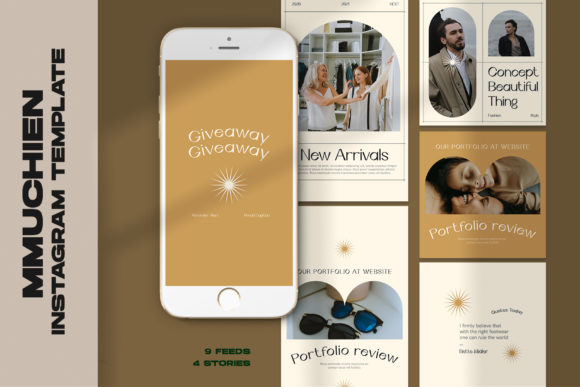
The template comes in versatile dimensions, catering to different social media needs. It includes sizes for 1200 x 1200 px, perfect for standard square Instagram posts, and 1920 x 1080 px, which is ideal for Instagram Stories, Reels covers, or even YouTube thumbnails. Having these multiple aspect ratios in one package allows for a cohesive cross-platform strategy, ensuring your brand looks uniform whether a user is scrolling through their feed or watching your stories.
Streamlined Workflow with Smart Objects
The true power of the Mmuchien Instagram Template lies in its use of Smart Objects. For anyone unfamiliar with advanced Photoshop features, this might sound intimidating, but the process is remarkably simple and designed to save time. Smart Objects act as containers for your images, preserving their original data and allowing you to replace them without disrupting the rest of the design layers, effects, or masks.
Here is how the workflow operates in practice:
- Open the PSD File: Launch the template in Adobe Photoshop.
- Locate the Image Group: Navigate to the layers panel and find the group labeled for image placement.
- Activate the Smart Object: Double-click on the layer icon within the image group. This action opens a separate tab containing the placeholder image.
- Insert Your Content: Paste or drag your own photograph or graphic into this new tab.
- Save and Update: Press CTRL + S (or Command + S on Mac) to save the Smart Object file. When you return to the main template tab, your image will automatically update, perfectly fitted into the design with all shadows, lighting adjustments, and filters applied instantly.
This "double-click and save" method eliminates the need to manually resize, crop, or mask every single photo you upload. It ensures that every image adheres to the same stylistic rules, creating a harmonious grid on your profile. Whether you are swapping out a product shot for a lifestyle image or updating a testimonial graphic, the process takes seconds rather than minutes.
Customization and Creative Control
While the structural elements of the design are pre-set to ensure aesthetic balance, the Mmuchien Instagram Template offers extensive flexibility for personalization. One of its standout features is that all text is fully editable. Using the standard text tool in Photoshop, you can change headlines, body copy, calls to action, and hashtags to match your specific campaign goals.
This level of editability is crucial for adapting the template to various contexts. You might use one layout to announce a flash sale, tweaking the text to highlight a discount percentage, and then use the same layout the next day to share an educational tip, simply by changing the wording. The font choices, sizing, and kerning are already optimized for readability on mobile devices, so you don't have to worry about choosing a typeface that looks good on a small screen. However, if your brand guidelines require a specific font, you can easily swap the existing fonts for your own while maintaining the overall layout integrity.
It is important to note that while the template provides the framework, images are not included. This is a deliberate choice to allow for complete creative freedom. You are encouraged to use your own high-quality photography, branded illustrations, or stock photos that align with your unique voice. This ensures that your content remains authentic and distinct from other users who might be utilizing similar resources.
Why This Template Fits Modern Workflows
In today's content creation ecosystem, the ability to batch-create assets is a game-changer. Instead of designing one post at a time, you can open the Mmuchien Instagram Template and prepare a week's worth of content in a single sitting. The consistent structure allows you to develop a rhythm, swapping images and updating text rapidly. This approach not only boosts productivity but also helps in maintaining a consistent brand voice and visual identity.
For agencies managing multiple clients, this template serves as a scalable solution. You can duplicate the file for each client, apply their specific color palettes and branding, and deliver high-quality assets quickly. The 300 DPI resolution means these files are future-proof; if a client decides to run an ad campaign in a magazine or print brochures based on their social media success, the assets are already print-ready.
Moreover, the ease of use lowers the barrier to entry for non-designers. Entrepreneurs, coaches, and content creators often wear many hats. They do not always have the budget to hire a full-time graphic designer, nor do they have the time to master complex software. This template empowers them to take control of their visual narrative. The clear instructions—double-click, insert, save—demystify the design process, turning a potentially frustrating task into a satisfying part of the creative workflow.
Making the Right Choice for Your Brand
When selecting a design resource, several factors come into play. Quality, ease of use, and flexibility are paramount. The Mmuchien Instagram Template checks these boxes by offering a professional foundation that respects the user's intelligence and time. It does not lock you into a rigid box; instead, it provides a sturdy scaffold upon which you can build your unique brand story.
Consider the long-term value of such a tool. Investing time in setting up a template system pays dividends in consistency. A cohesive Instagram grid attracts more followers, increases engagement, and builds trust with your audience. When your posts look professional, your brand is perceived as more authoritative and reliable. The difference between a haphazardly assembled graphic and one created with a structured template like this is often the difference between a scroll-past and a double-tap.
Additionally, the technical precision of the file—RGB color mode, high resolution, and smart object integration—ensures that you are working with a tool that meets industry standards. There is no guesswork involved regarding file settings or export qualities. You can proceed with confidence, knowing that the final output will look exactly as intended across all devices.
Ultimately, tools like the Mmuchien Instagram Template are about empowerment. They remove the technical friction that often stifles creativity, allowing you to focus on what truly matters: connecting with your audience through compelling visuals and meaningful messages. By integrating this template into your routine, you streamline your production process, elevate your brand aesthetics, and position yourself for greater success in the competitive landscape of social media.