Editable Thumbnail Design: Your Key to Video Success
In the fast-paced world of digital content, the first impression is often the only one you get. Whether you are running a YouTube channel for your small business, promoting an online course, or sharing educational updates for a school, the visual hook that draws viewers in is critical. This is where an editable thumbnail design becomes an indispensable tool for creators and marketers alike. Instead of starting from scratch or hiring a graphic designer for every single upload, these pre-made templates offer a professional foundation that you can customize to fit your specific brand and message instantly.
Think of a thumbnail as the digital storefront window for your video. If the window is cluttered, dull, or confusing, people will walk right past it. A well-crafted design grabs attention, communicates the topic clearly, and entices the click. The beauty of using a customizable template lies in its balance between professional quality and user-friendly flexibility. You do not need to be a Photoshop expert to make it work; you simply need a clear idea of what you want to say and the right file format to execute it.
Why Customization Matters for Your Brand
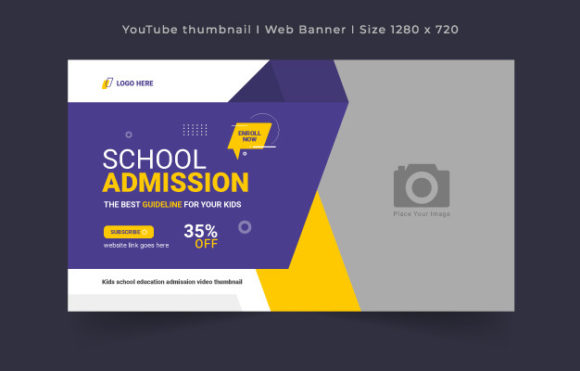
The primary appeal of an editable thumbnail design is the ability to maintain consistency while adapting to new content. When audiences see a familiar color scheme, font style, or layout, they immediately recognize your content amidst a sea of competitors. This is particularly vital for niches like kids' school education or admission drives, where trust and clarity are paramount. Parents and students need to know instantly that a video is relevant to their needs before they even press play.
Using a template ensures that every video you publish looks like part of a cohesive series. Imagine a school releasing a weekly update on admission procedures. If the first video has a sleek, professional banner and the second one looks like it was made in five minutes with mismatched fonts, it creates a sense of disorganization. With a fully editable template, you swap out the text and the background image, but the core structure remains solid. This saves hours of design time and eliminates the stress of trying to match colors or align elements perfectly every single time.
Understanding the Technical Specifications
To get the most out of these resources, it helps to understand what you are working with. High-quality templates typically come in EPS format, which stands for Encapsulated PostScript. This is a vector-based file type, meaning the graphics are defined by mathematical paths rather than fixed pixels. The major advantage here is scalability; you can resize elements within the design without losing any sharpness or clarity. Whether you are viewing it on a massive 4K monitor or a small smartphone screen, the lines remain crisp.
Standard dimensions for these designs are usually set at 1280×720 pixels. This is the classic HD resolution (720p) that serves as the baseline for most video platforms. While many sites support higher resolutions like 1080p or 4K, starting with a clean 720p canvas ensures compatibility across all devices and keeps file sizes manageable for quick uploading. The color mode is typically RGB, which is optimized for screens, ensuring that the vibrant blues, reds, and greens you select look exactly as intended on digital displays. Additionally, a resolution of 300 DPI (dots per inch) guarantees that if you ever decide to print this design for a flyer or a web banner, the output will be sharp and professional, not pixelated or blurry.
Practical Applications Beyond YouTube
While the term "thumbnail" suggests a small image for a video player, the utility of these templates extends far beyond just YouTube covers. Because the file is well-organized and easy to edit, it serves as a versatile asset for various digital marketing needs. For instance, the same 1280×720 layout can be repurposed as a web banner for your school's homepage, highlighting upcoming admission dates or special events. It can also function as a header image for social media posts on platforms like Facebook or LinkedIn, where visual consistency helps build brand authority.
Consider a freelance educator creating a course on mathematics for middle schoolers. They can use the template to create a sequence of thumbnails for each lesson module. By keeping the layout identical but changing the specific topic title and the student image, they create a visual curriculum map that looks organized and inviting. Similarly, a local business owner hosting a webinar on entrepreneurship can use the same file to generate promotional graphics for email newsletters, ensuring that the invitation looks just as polished as the event itself.
What to Keep in Mind Before You Start
Before diving into editing, there are a few practical considerations to ensure a smooth workflow. First, remember that while the template provides the structure, images are usually not included. This is actually a benefit, as it allows you to insert photos that are specific to your content. However, it means you need to have high-quality photos ready to go. Blurry or poorly lit photos can ruin an otherwise perfect design, so always source clear, bright images that complement the text.
Another important factor is the font usage. Most professional templates utilize free fonts to ensure that anyone can open and edit the file without purchasing expensive licenses. However, you should verify which fonts are used and ensure they are installed on your computer or available for download. If a font is missing, the software may substitute it with a default option, which could throw off your entire layout. Taking a moment to install the correct typography beforehand saves frustration later.
Furthermore, the "well-organized" nature of these files relies on layers. When you open the EPS file in compatible software like Adobe Illustrator or CorelDRAW, you will see different elements stacked on top of each other. To edit effectively, take a moment to explore the layer panel. Lock the background layers so you don't accidentally move them, and keep your text layers easily accessible. Understanding this hierarchy makes the editing process intuitive rather than chaotic.
Maximizing Value for Educators and Entrepreneurs
For those in the education sector, specifically regarding school admissions, the stakes are high. Parents are looking for reliability and excellence. A generic, low-effort thumbnail might suggest a lack of attention to detail in the school's administration. Conversely, a polished, custom-branded thumbnail signals professionalism. It tells the viewer that the institution cares about presentation and, by extension, the quality of education provided. Using a customizable template allows schools to rapidly produce content for open days, virtual tours, and teacher introductions without needing a dedicated design team on staff.
Entrepreneurs and bloggers face similar pressures. In a saturated market, your visual identity is your differentiator. An editable thumbnail design empowers you to test different headlines and images quickly. You can try a version with a bold question as the title, and another with a shocking statistic, seeing which one resonates more with your audience. This agility is impossible if you are waiting days for a designer to return drafts. With a template, you are the designer, and you can iterate in real-time based on performance data.
Ultimately, the goal is to communicate your message effectively and efficiently. These templates bridge the gap between amateur efforts and professional results. They provide the structural integrity of a designer's work while leaving the creative soul of the project in your hands. Whether you are announcing a new semester, launching a product, or sharing a tutorial, having a reliable, high-resolution, and fully adjustable design asset in your toolkit is a smart investment in your digital presence.