Elevate Your Broadcast with a Professional Streaming Overlay Panel Design
There is a distinct moment in every streamer's journey when the gameplay stops being the only thing that matters. You might have incredible reflexes, a witty commentary style, or a game strategy that leaves viewers in awe, but if your channel looks like a blank canvas from 2010, potential subscribers might scroll right past. This is where a thoughtful Streaming Overlay Panel Design becomes the difference between a hobbyist broadcast and a professional brand. It isn't just about making things look pretty; it is about creating an immersive environment that tells your audience who you are before you even say a word.
When you decide to complete your desktop gaming PC setup with custom graphics, you are essentially building a digital stage. Think of it like a news anchor having a sleek studio background or a musician having stage lighting. The overlay acts as the frame for your content, guiding the viewer's eye to what matters most while providing essential information without cluttering the screen. Whether you are broadcasting on Twitch, Mixer, Facebook Gaming, or YouTube, the visual language you choose sets the tone for the entire community you are trying to build.
Why Visual Identity Matters in Real-World Scenarios
In the saturated world of live streaming, first impressions happen in seconds. Imagine a viewer clicking on a directory of live games. They see dozens of thumbnails and live previews. The streams that stand out are often the ones with cohesive branding. A well-designed overlay package signals that you take your craft seriously. It suggests reliability and quality. If a viewer sees a chaotic, mismatched, or default OBS layout, they might assume the audio quality is poor or the connection is unstable, even if that isn't true. Visual cues subconsciously inform the audience about the production value they can expect.
Consider the scenario of a competitive esports player. Their audience is there for high-level play and fast-paced action. For this demographic, a minimalistic Streaming Overlay Panel Design works best. They need clear webcam frames that don't obscure vital UI elements of the game, clean alert boxes that notify them of new followers without blocking the action, and perhaps a subtle scoreboard integration. The design here serves a functional purpose: clarity. It ensures that the intensity of the match is never diluted by distracting graphics.
On the other end of the spectrum, consider a "Just Chatting" streamer or a creative artist who paints digitally while interacting with their community. Their needs are entirely different. They benefit from elaborate borders, animated backgrounds, and detailed profile art that fills the empty space around their camera feed. Here, the overlay becomes part of the entertainment. It creates a cozy, lounge-like atmosphere where viewers feel invited to hang out. The design facilitates conversation and community building rather than just framing gameplay.
The Power of Customization and Flexibility
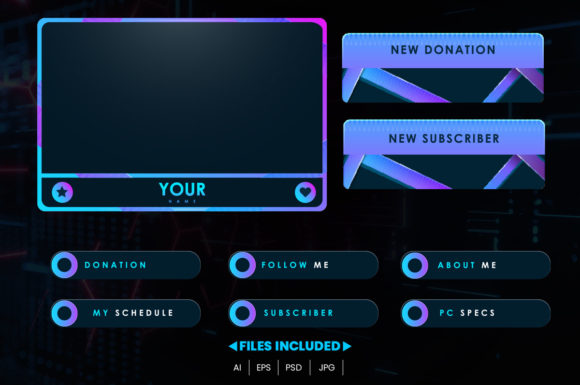
One of the biggest misconceptions about using pre-made assets is that you lose your unique voice. However, modern Streaming Overlay Panel Design packages are built with flexibility in mind. The best resources available today come in formats like AI, EPS, JPG, and PSD, specifically because creators understand that no two channels are identical. When you download a product file and unzip it, you aren't just getting a static image; you are getting a toolkit.
Having access to layered PSD (Photoshop) or AI (Illustrator) files is a game-changer. It means you aren't stuck with a color scheme that doesn't match your logo. Maybe the template comes in neon green, but your brand is deep purple and gold. With editable layers, you can change colors instantly. Perhaps you want to move the location of your recent follower alert from the top right to the bottom left to avoid covering a specific part of the game map. Because the elements are separated into layers, you can move them freely. You can even hide or show specific components to obtain more unique results. Want a version of your overlay for retro gaming nights that removes the modern tech accents? Just toggle a layer off. This level of control allows you to adapt your look for special events, holidays, or sponsorship integrations without needing to hire a graphic designer every time.
Beyond Gamers: Diverse Applications for Overlay Assets
While these tools are specially designed for gamers, their utility extends far beyond the battlefield of Call of Duty or the realms of Elden Ring. Content creators in various industries are leveraging these designs to professionalize their live video output. Fitness instructors streaming workout sessions use overlay panels to display timers, rep counts, and motivational quotes in real-time. The structure provided by a good overlay keeps the instructional content organized and easy to follow.
Musicians and DJs performing live sets utilize these assets to display tracklists, social media handles, and donation goals. In this context, the "gaming" aesthetic can be swapped for something more club-oriented or acoustic, thanks to the editable nature of the files. Even educators and tech reviewers hosting live Q&A sessions benefit from the structured layout. An overlay provides a designated space for questions, keeping the main video feed clear for the demonstration. The versatility of a solid Streaming Overlay Panel Design lies in its ability to organize information visually, regardless of the subject matter.
Practical Considerations Before You Commit
Before you rush to download and install, there are a few practical things to keep in mind to ensure the final result looks professional. First, consider your hardware limitations. While high-resolution JPGs and complex vector animations look stunning, they do consume system resources. If you are running a demanding game on a single PC setup, ensure that your overlay assets are optimized. Heavy, unoptimized graphics can cause frame rate drops, which ironically hurts the viewer experience more than a simple design would.
Secondly, think about readability. It is tempting to use fancy fonts and intricate patterns, but if your viewers can't read your latest donor's name or your social media handle within two seconds, the design has failed its primary function. Contrast is key. Ensure that text stands out against the background elements. When editing your PSD or AI files, pay attention to the hierarchy of information. What is the most important thing for the viewer to see? That element should be the most prominent.
Also, be mindful of platform differences. While a design might look perfect on a desktop monitor, remember that a significant portion of your audience might be watching on mobile devices. Elements that are placed too close to the edges of the screen might get cropped out on phones. A good practice is to keep critical information within a "safe zone" in the center of the frame. Testing your overlay on different devices before going live can save you from embarrassing formatting errors.
Maximizing the Value of Your Asset Pack
When you acquire a comprehensive pack containing AI, EPS, JPG, and PSD files, you are investing in longevity. The JPGs are great for immediate use—plug and play for a quick setup. But the real value lies in the vector and layered files. As your channel grows, your brand will evolve. You might rebrand your logo or shift your color palette. Having the source files means your overlay grows with you. You don't have to buy a new pack every six months; you just edit the existing one.
Furthermore, these assets allow for consistency across platforms. You can use the same color schemes and font styles from your overlay to create matching profile banners, offline screens, and social media posts. This cross-platform consistency reinforces your brand identity. When a viewer sees your tweet, visits your YouTube channel, and then watches your Twitch stream, the visual continuity makes your brand feel established and trustworthy.
Ultimately, completing your desktop gaming PC setup isn't just about having the fastest GPU or the most mechanical keyboard keys. It is about the total package you present to the world. A professional Streaming Overlay Panel Design bridges the gap between your raw talent and your audience's perception. It turns a simple video feed into a destination. By choosing editable, high-quality assets, you empower yourself to curate an experience that is uniquely yours, adaptable to any situation, and ready to welcome viewers into your community.