Designing a Music Event Social Media Post That Sells Out
The difference between a crowded venue and an empty room often comes down to the first impression your audience sees on their feed. In a digital landscape saturated with noise, a Music Event Social Media Post is not just an announcement; it is the visual hook that stops the scroll and converts interest into ticket sales. Whether you are promoting a local indie gig, a massive festival, or an intimate jazz night, the assets you use define the perceived value of the experience before a single note is played.
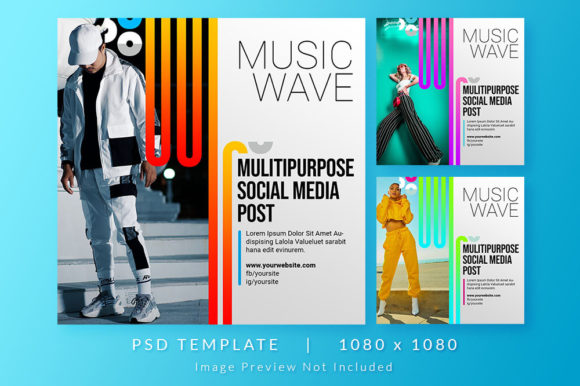
Consider the specific utility of a high-quality, customizable template designed for this exact purpose. A professional-grade item description often highlights critical specs: a PSD file in RGB color mode, sized perfectly at 1080 x 1080 pixels, and offering three distinct theme colors. These are not arbitrary technical details; they are the building blocks of a campaign that looks cohesive across Instagram, Facebook, and LinkedIn. When you start with a solid foundation, you spend less time wrestling with alignment tools and more time refining the message that resonates with your audience.
The Strategic Value of Modular Design
Why focus on a template with three theme colors? Flexibility is the currency of modern marketing. A music event rarely has a static identity throughout its lifecycle. The "teaser" phase might require a dark, mysterious palette to build intrigue. The "lineup reveal" demands high contrast and bold typography to highlight artist names. Finally, the "last call" needs urgency, often signaled by vibrant, energetic hues. Having a single PSD source file that allows you to swap between three pre-designed color themes means you can maintain brand consistency while adapting to different stages of your promotional timeline.
Working in RGB color mode ensures that what you see on your screen is exactly what your audience sees on their devices. Unlike CMYK, which is reserved for print, RGB captures the full spectrum of light emitted by smartphones and monitors. This is crucial for music events where lighting, neon, and stage visuals are part of the allure. If your social banner looks dull or washed out on a mobile screen, it subconsciously suggests the event itself will lack energy. A crisp 1080 x 1080 pixel canvas guarantees sharpness on high-resolution displays, ensuring your graphics look professional whether viewed on an older phone or the latest tablet.
Creative Applications for Diverse Users
The beauty of a well-structured Music Event Social Media Post template lies in its adaptability for various creators. It is not solely the domain of graphic designers; it is a tool for entrepreneurs, band managers, venue owners, and freelance marketers who need to produce results quickly without sacrificing quality.
- Independent Artists: Use the template to announce release parties or acoustic sessions. By sticking to one of the three theme colors that matches your album art, you create a recognizable visual signature that fans begin to associate with your sound.
- Venue Promoters: For clubs hosting weekly nights, consistency is key. You can rotate the theme colors to denote different genres—perhaps blue for blues nights, red for rock, and green for electronic—while keeping the layout familiar so regulars instantly recognize the update.
- Festival Organizers: Large-scale events require a hierarchy of information. A layered PSD allows you to emphasize headliners while keeping supporting acts legible. The square format is ideal for grid planning, allowing you to preview how individual posts look together as a mosaic on your profile.
- Corporate Event Planners: Even company holiday parties or team-building concerts benefit from professional visuals. A polished banner signals that the event is well-organized and worth attending, boosting internal engagement.
Optimizing for Platform Algorithms and Human Eyes
While the 1080 x 1080 dimension is the industry standard for square posts, the way you utilize that space matters. Social media algorithms favor content that keeps users engaged. A cluttered design causes users to scroll past immediately. Effective use of white space (or negative space) guides the eye naturally from the headline to the date, then to the call-to-action button or link.
When customizing your Music Event Social Media Post, consider the platform context. On Instagram, the image is the entire story. On Facebook or LinkedIn, it accompanies text. Ensure your most critical information—the artist name and the date—is contained within the central safe zone. Avoid placing vital text too close to the edges, where interface elements like "Like" buttons or crop previews might obscure them on different devices.
Furthermore, the three theme colors offered in such templates are an opportunity for A/B testing. Run two versions of the same event announcement with different color schemes to see which generates more clicks or saves. Data-driven creativity is far more powerful than guessing. You might find that a minimalist black-and-white theme outperforms a colorful one for a classical concert, while a vibrant gradient drives more engagement for a summer block party.
Practical Steps for Customization
To get the most out of a PSD template, you do not need to be a Photoshop expert, but understanding the layer structure helps. Most professional files organize elements logically: background layers at the bottom, texture overlays in the middle, and text layers at the top.
- Replace Placeholder Images: Swap out generic stock photos with high-resolution shots of the performing artists. Authentic imagery connects better with audiences than abstract graphics alone.
- Adjust Typography: While the font choices in the template are curated for style, ensure the text is legible. If an artist's name is long, adjust the tracking (spacing between letters) rather than shrinking the font size to the point of unreadability.
- Leverage Smart Objects: Many high-quality PSDs use Smart Objects for images. This allows you to double-click a layer, paste your new image, save, and have it automatically masked and filtered to fit the design perfectly.
- Export Correctly: Always export your final version as a PNG for web use to preserve transparency and sharpness, or a high-quality JPG if file size is a concern for slower loading times.
Maintaining Brand Integrity Across Campaigns
One of the biggest challenges in event marketing is fragmentation. Different team members might create posts that look disjointed, confusing the audience. By adopting a unified Music Event Social Media Post system based on a single template with variable themes, you ensure that every piece of content feels part of the same universe. This organizational discipline builds trust. When a user sees a post that looks professionally crafted, they assume the event production will be equally professional.
Consistency also aids in recall. If your audience sees your specific color palette and layout style repeatedly, they begin to recognize your brand before reading the text. This is invaluable for recurring events or touring acts. It transforms a one-off flyer into a lasting brand asset.
Ultimately, the goal is to remove friction between the fan and the experience. A well-designed social banner answers the questions of who, what, where, and when in a split second. It creates an emotional anticipation that compels the user to click "Interested" or buy a ticket. By utilizing a flexible, high-resolution, and thoughtfully designed template, you equip yourself with the visual authority needed to stand out in a crowded feed. The music draws them in, but the design gets them through the door.