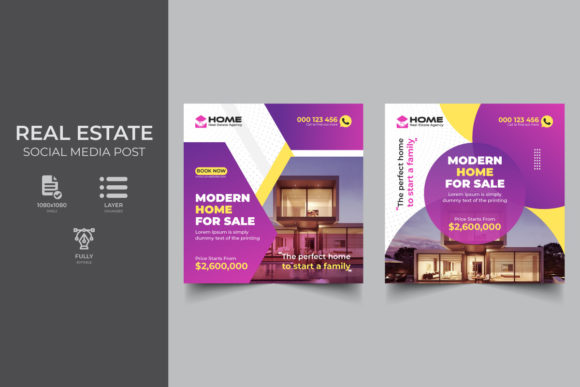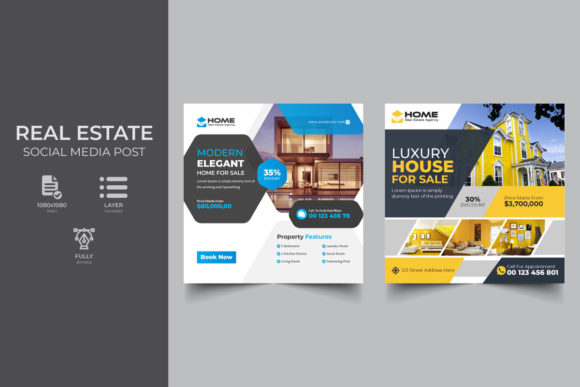
Creative Real Estate Social Media Banner Ideas
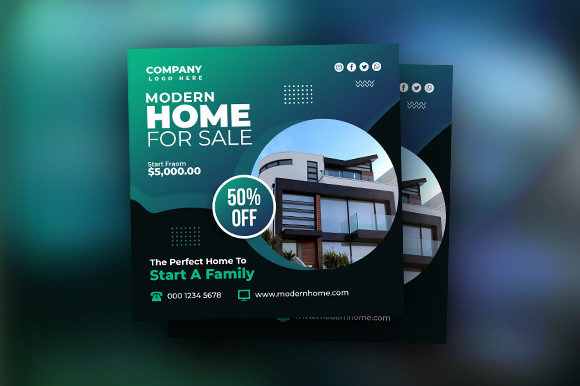
In the fast-paced world of property sales, first impressions are often digital. Before a potential buyer steps foot inside a home, they have likely scrolled past dozens of listings on their phone. This is where a Creative Real Estate Social Media Banner becomes more than just a graphic; it is a critical tool for capturing attention and driving engagement. For realtors, agents, and property managers, the ability to produce high-quality, visually compelling content quickly can be the difference between a stagnant listing and a sold property.
The concept of using pre-designed templates is not about cutting corners; it is about working smarter. A well-structured Real Estate Social Media Banner Template provides a professional foundation that allows you to focus on the unique selling points of each property rather than struggling with design software basics. Whether you are advertising a luxury penthouse, a cozy family home, or a commercial space for rent, having a versatile design system in place streamlines your workflow and ensures brand consistency across all platforms.
Why Visual Consistency Matters in Property Marketing
When buyers browse Facebook, Instagram, or LinkedIn, they are looking for trust and clarity. Inconsistent branding—where one post uses a neon font and the next uses a faded filter—can make an agency appear disorganized. Utilizing a standardized template approach helps establish a recognizable visual identity. When followers see a specific layout, color palette, or typography style, they immediately associate it with your agency.
A Creative Real Estate Social Media Banner allows you to maintain this consistency while still offering variety. By swapping out images and adjusting text within a layered PSD file, you can create endless variations that feel fresh yet familiar. This balance is crucial for keeping your audience engaged without confusing them. It signals professionalism and suggests that if you pay attention to the details of your marketing, you will surely pay attention to the details of the transaction.
Adapting Templates for Different Platforms and Goals
One size does not fit all in social media marketing, but a flexible template system comes close. The best templates are designed with adaptability in mind, allowing you to tweak the composition for specific platform requirements.
- Instagram Square (1080x1080): Perfect for feed posts showcasing high-resolution interior shots. The square format demands a centered focus, making it ideal for highlighting a single stunning feature like a fireplace or a view.
- Facebook Cover or Link Preview: These often require wider aspect ratios. A good template allows you to expand the background image or rearrange text blocks to fit these dimensions without losing impact.
- LinkedIn Professional Posts: When targeting investors or commercial clients, the tone shifts. You might use the same template structure but swap vibrant colors for more subdued, corporate tones and focus on data-driven text like ROI or square footage.
The key is to understand the intent of the user on each platform. On Instagram, users are inspired by aesthetics; on LinkedIn, they are informed by facts. Your Real Estate Social Media Banner Template should be flexible enough to accommodate both approaches simply by changing the image and the copy.
Creative Applications Beyond Standard Listings
While "Just Listed" and "Sold" signs are staples of real estate marketing, limiting your banners to these two categories misses a huge opportunity for connection. Creative professionals know that content diversity builds community. Here are several ways to expand the use of your banner templates:
Neighborhood Spotlights
Use the template to highlight local amenities. Replace the house photo with an image of a popular local park, a trendy coffee shop, or a top-rated school. Add text that emphasizes the lifestyle benefits of the area. This positions you not just as a seller of houses, but as an expert on the community.
Home Staging and Renovation Tips
Educational content performs exceptionally well. Create a series of banners offering quick tips on increasing curb appeal or staging a living room. Use the smart object layers to insert before-and-after photos. This demonstrates your expertise and provides value to followers who may not be ready to buy today but will be in the future.
Open House Invitations
An open house banner needs to convey urgency and excitement. Use bold typography for the date and time. Ensure the address is legible even on small mobile screens. A creative twist is to include a QR code within the design that links directly to the virtual tour or registration page.
Client Testimonials
Social proof is powerful. Design a variation of your template specifically for quotes. Use a warm, inviting background image and overlay a short, punchy testimonial from a happy client. This humanizes your brand and builds trust with prospective buyers.
Practical Workflow for Efficient Editing
The true power of a Creative Real Estate Social Media Banner lies in its ease of use. Most professional templates come as layered PSD files with smart objects. This technical feature is a game-changer for non-designers. Instead of manually resizing and cropping images, which can lead to pixelation or awkward framing, you simply double-click the smart object layer, paste your new photo, and save. The template automatically applies the correct dimensions and masks.
To keep your workflow efficient:
- Organize Your Assets: Keep a folder of high-quality property photos ready to go. Ensure they are well-lit and professionally edited before importing them into the template.
- Master the Text Hierarchy: Know which text elements are essential (price, address, call to action) and which are decorative. Never clutter the banner. White space is your friend; it guides the eye to the most important information.
- Check Readability: Always preview your banner on a mobile device. Text that looks clear on a desktop monitor might be unreadable on a smartphone screen. If necessary, increase the font size or add a semi-transparent overlay behind the text to improve contrast against the background image.
- Batch Your Work: Instead of creating one banner at a time, set aside an hour to create a week's worth of content. Swap out images and update text for multiple properties in one sitting. This batch processing saves significant time and keeps your social media presence active.
Maintaining Originality Within a Template
A common concern with using templates is the fear that everyone's marketing will look the same. However, a template is merely a skeleton; the flesh and blood come from your content. You can ensure originality by carefully curating your photography. No two properties have the same light, angle, or decor. By letting the unique character of each home shine through the image slot, your banners remain distinct.
Furthermore, do not be afraid to experiment with the editable elements. Change the accent colors to match the season—warm oranges for autumn listings, cool blues for summer beach houses. Adjust the headline fonts to match the vibe of the property, perhaps using a sleek sans-serif for modern condos and a classic serif for historic estates. These small tweaks keep the Real Estate Social Media Banner Template feeling fresh and tailored to the specific listing.
Final Thoughts on Digital Presence
In today's market, your digital presence is your storefront. A Creative Real Estate Social Media Banner is an essential tool for making that storefront attractive, informative, and inviting. It bridges the gap between professional design quality and the need for rapid, daily content creation. By leveraging these tools effectively, real estate professionals can spend less time wrestling with design software and more time connecting with clients, showing properties, and closing deals.
Remember, the goal is not perfection in every pixel, but clarity in communication. Use these templates to tell the story of each property clearly and beautifully. Whether you are a solo agent building your personal brand or part of a large agency managing hundreds of listings, a solid design strategy empowers you to stand out in a crowded feed and turn scrollers into buyers.