Burger Instagram Story Template for Fast Edits
In the fast-paced world of social media marketing, visual consistency is often the difference between a scroll-past and a conversion. For food businesses, bloggers, and content creators, the pressure to produce high-quality, appetizing imagery daily can be overwhelming. This is where a specialized design asset like the Burger Template - Instagram Story becomes an essential tool in your digital workflow. It is not merely a pre-made graphic; it is a structured framework designed to streamline your content creation process while maintaining a professional aesthetic that resonates with hungry audiences.
The core value of this template lies in its technical foundation. Built as a PSD file compatible with CS5 or higher, it leverages the power of Photoshop's Smart Objects. For those unfamiliar with the term, Smart Object Replacement is a game-changer for efficiency. Instead of manually resizing, cropping, or masking every new photo you take of your latest menu item, you simply double-click the layer, paste your image, and save. The template automatically adjusts the photo to fit the designated space perfectly, preserving the original design integrity. This feature alone can reduce the time spent on story creation from twenty minutes to under two, allowing you to focus more on engaging with your community and less on pixel-pushing.
Maximizing Visual Impact with High-Resolution Assets
One of the most critical yet often overlooked aspects of digital design is resolution. Many free or low-quality templates are optimized only for screen viewing at 72dpi, which can result in blurry edges or pixelation when viewed on high-density Retina displays common in modern smartphones. This Burger Template - Instagram Story is crafted at 300dpi. While Instagram compresses images upon upload, starting with a high-resolution source ensures that the final output retains maximum clarity and sharpness. This attention to detail signals professionalism to your viewers, subtly reinforcing the quality of the food or brand you are promoting.
The structure of the file further supports this quality. The layers are organized and editable, meaning you aren't stuck with a rigid layout. Whether you need to shift the position of a text box to accommodate a longer headline, change the font color to match a seasonal promotion, or adjust the background hue to align with your brand guidelines, the flexibility is built-in. This level of control is vital for marketers who need to adapt quickly to trending topics or flash sales without sacrificing design coherence.
Practical Applications for Diverse Creators
Who benefits most from this specific type of asset? The utility extends far beyond just burger joints. Consider a freelance food photographer looking to showcase their portfolio. Using this template allows them to present their work in a standardized, polished format that highlights their lighting and composition skills without the distraction of a cluttered layout. Similarly, a local restaurant owner running a "Burger of the Month" campaign can use the template to announce new items consistently. By keeping the frame and typography consistent while swapping out the hero image, they build brand recognition; followers instantly know a new update has arrived just by recognizing the visual style.
Educators and culinary schools can also leverage this tool. Imagine a cooking instructor sharing a step-by-step recipe breakdown. They can use the template to feature the final dish prominently while using the organized layers to add clear, legible text overlays for ingredients or cooking tips. The Read Me.txt file included in the download provides necessary instructions, ensuring that even users with intermediate Photoshop skills can navigate the file structure confidently. This lowers the barrier to entry for creating professional-grade content, democratizing high-quality design for small business owners who may not have the budget for a dedicated graphic designer.
Streamlining Workflow with Organized Layers
The true test of a good template is how it handles complexity. A messy file with hundreds of unnamed layers can be a nightmare to edit. This template addresses that pain point by providing organized layers. Groups are logically named, separating background elements, image placeholders, text fields, and decorative graphics. This organization means you spend less time hunting for the right layer and more time refining your message. For agencies managing multiple client accounts, this structure allows for rapid scaling. You can duplicate the file, swap the branding colors, replace the burger image with a different product, and have a new campaign ready in moments.
Furthermore, the inclusion of a Preview jpg file allows you to visualize the end result before you even open Photoshop. This is particularly helpful when planning a content calendar. You can assess how the template looks with different color schemes or image types to ensure it fits your overall feed aesthetic. It serves as a quick reference guide, helping you make informed decisions about which assets to use for specific campaigns.
Navigating Limitations and Best Practices
While the Burger Template - Instagram Story offers significant advantages, it is important to understand its scope to manage expectations effectively. As noted in the product details, the image is not included and is for preview purposes only. This is a standard industry practice, but it means the onus is on you to provide high-quality photography. No template can fix a poorly lit or low-resolution photo. To get the best results, ensure your source images are well-lit, in focus, and ideally shot from an angle that complements the template's framing. If the template features a circular mask, for instance, a top-down shot of a burger might work better than a side profile.
Additionally, while the file is editable, it requires Adobe Photoshop CS5 or higher. Users relying solely on mobile apps or free alternatives like Canva may find the PSD format inaccessible unless they have access to desktop software. However, for those within the Adobe ecosystem, the integration is seamless. It is also worth noting that while the template is designed specifically for burgers, its layout principles are versatile. With minor tweaks to the text and perhaps a slight color adjustment, the same structural layout could effectively promote sandwiches, tacos, or even non-food items like cosmetics, provided the focal point remains central.
Enhancing Brand Communication
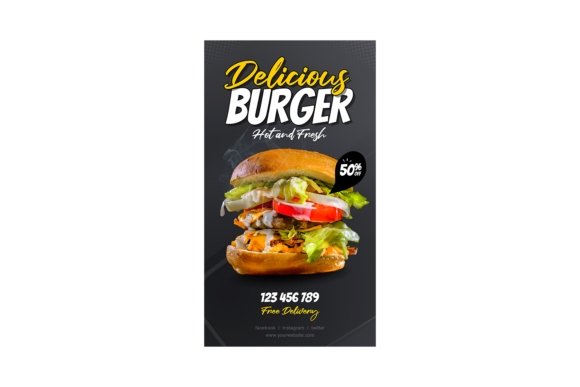
Ultimately, the goal of using a template like this is to strengthen communication. In a crowded feed, clarity is king. A well-designed story guides the viewer's eye naturally from the appetizing image to the call-to-action. The Burger Template - Instagram Story facilitates this flow through balanced composition and thoughtful typography placement. By removing the guesswork from design, you ensure that your message is delivered clearly and professionally every time.
For entrepreneurs and hobbyists alike, time is a scarce resource. Investing in a tool that simplifies the creative process allows you to maintain a consistent posting schedule, which is crucial for algorithmic visibility. Consistency builds trust, and trust drives engagement. Whether you are launching a new food truck, promoting a blog post about comfort food, or simply sharing your weekend cooking adventures, having a reliable, high-quality template in your arsenal empowers you to tell your story with impact.
In conclusion, the combination of Smart Object Replacement, 300dpi resolution, and organized layers makes this PSD file a robust solution for modern content creation. It bridges the gap between amateur snapshots and professional marketing materials. By understanding how to leverage its features and acknowledging the need for quality source imagery, users can transform their Instagram Stories into powerful vehicles for engagement and growth. The PSD file, accompanied by the Preview jpg and instructional Read Me.txt, provides everything needed to start creating immediately, offering a practical path to elevated visual storytelling.