Mastering Design Efficiency with the 17 Black Watercolor Brush Strokes Bundle
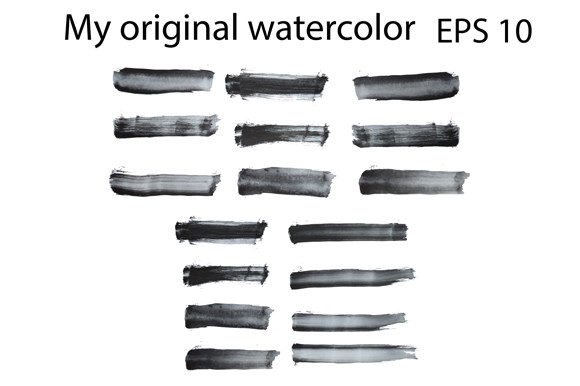
In the fast-paced world of graphic design and digital entrepreneurship, the difference between a project that feels handmade and one that looks generic often comes down to texture. Many creators spend hours trying to replicate organic imperfections using standard digital tools, only to end up with results that feel stiff or overly uniform. This is where a curated collection like the 17 Black Watercolor Brush Strokes Bundle becomes an essential asset rather than just another download. It offers a shortcut to authenticity, providing high-resolution, original artwork that instantly adds depth and character to your projects.
However, simply purchasing a bundle of assets does not guarantee professional results. A common misunderstanding among beginners and even seasoned freelancers is treating digital brushes as a magic wand. The reality is that how you integrate these elements determines their effectiveness. Whether you are designing print shirts, creating stickers for an online store, or mocking up branding for a client, there are specific pitfalls to avoid to ensure your final output maintains its quality and appeal.
The Trap of Low-Resolution Substitutes
One of the most frequent mistakes designers make is settling for low-quality images found on free stock sites. When you scale a small JPEG image up to fit a t-shirt design or a large poster, the result is often pixelation and blurry edges that destroy the illusion of a hand-painted stroke. This not only looks unprofessional but can also lead to rejected files from print-on-demand services.
The 17 Black Watercolor Brush Strokes Bundle addresses this by offering high-resolution files specifically engineered for scalability. However, users must still be vigilant about which file format they choose for their specific workflow. For instance, if you are working in Adobe Illustrator or CorelDraw, relying solely on the PNG files might limit your ability to recolor or manipulate the shape of the stroke without losing quality. The included EPS10 file is the superior choice here. It allows you to vectorize the strokes, meaning you can expand them to the size of a billboard without any loss of clarity. Ignoring the vector option is a missed opportunity for maximum flexibility.
Misunderstanding File Formats and Workflow
Another area where creators often stumble is confusion regarding file compatibility. You might download a comprehensive pack and immediately try to open every file in every program, leading to frustration when things don't look right. It is crucial to understand the distinct purpose of each format provided in this bundle:
- EPS10: Best for vector-based software like Adobe Illustrator and CorelDraw. Use this when you need to change the color of the black stroke to match a brand palette or when scaling is a priority.
- PNG with Transparent Background: Ideal for raster-based programs like Photoshop, Procreate, or Canva. These are ready-to-use "drag and drop" elements that save time when you need immediate texture.
- PDF: Often overlooked, this format is excellent for quick previews or for clients who need to view the assets without having specialized design software installed.
Failing to match the file type to your software can result in unnecessary extra steps, such as manually removing backgrounds or tracing images that were already vector-ready. By selecting the correct format from the start, you streamline your production time, allowing you to focus on creativity rather than technical troubleshooting.
Application Errors in Print and Merchandise
When applying these watercolor strokes to physical products like baby infant wear, caps, or stickers, the context of the design matters immensely. A common error is overcrowding the design. Because watercolor strokes have a bold, artistic presence, using too many of them can make a layout look chaotic and muddy. This is particularly important for smaller items like stickers or infant clothing, where fine details can get lost during the printing process.
To avoid this, adopt a "less is more" approach. Use a single, well-placed stroke from the 17 Black Watercolor Brush Strokes Bundle as a dynamic background element behind text, or as a subtle underline to highlight a logo. For example, if you are designing a cap, a single curved stroke can follow the contour of the hat's brim, adding movement without overwhelming the limited surface area. For baby clothing, ensure the opacity is adjusted so the black ink doesn't appear too harsh against soft pastel fabrics; the transparent background of the PNGs makes blending these elements seamless.
Overlooking Color Modes for Print
A technical oversight that can cost money and time is ignoring color modes. Most digital screens display colors in RGB, but professional printing for shirts and stickers requires CMYK. While the bundle provides black strokes, which are generally safe across both modes, issues arise if you attempt to recolor the EPS files without converting your document settings first. If you design a vibrant red stroke in RGB and send it directly to a printer expecting the same pop, you may end up with a dull, muddy brown.
The corrective action is simple but vital: always set your document to CMYK before importing and editing the vector files if the end goal is physical merchandise. This ensures that what you see on your screen closely matches the final printed product. Additionally, when working with the black strokes, check the "rich black" settings in your print software. Sometimes, a standard 100% black K-channel is sufficient, but for deep, solid areas in large prints, a rich black mixture prevents banding or grayish tones.
Maximizing Value for Entrepreneurs and Freelancers
For small business owners and marketers, time is currency. The temptation to create everything from scratch to save money often leads to burnout and delayed product launches. Investing in a pre-made, high-quality asset pack is a strategic decision that boosts efficiency. However, the mistake lies in using these assets without customization. If every seller in your niche uses the exact same brush stroke in the exact same way, your brand loses its unique identity.
To stand out, use the 17 Black Watercolor Brush Strokes Bundle as a foundation, not the final product. Combine different strokes to create new shapes, mask them with text, or layer them with other textures. The fact that these are original works gives you a legal safety net to modify and build upon them for commercial use. Always review the licensing terms, but generally, bundles like this are designed to empower you to create derivative works for sale, such as printed shirts or digital planners.
Ultimately, the goal is to elevate your visual communication. Whether you are an educator creating engaging worksheets, a blogger designing eye-catching social media headers, or a freelancer pitching a branding package, the quality of your textures speaks volumes about your attention to detail. By avoiding the pitfalls of low resolution, format confusion, and poor composition, you transform a simple download into a powerful tool for professional growth. Take the time to understand the tools you buy, experiment with the vector capabilities, and apply these organic elements with intention. Your audience will notice the difference between a rushed design and one that feels crafted with care.