Breakfast Template Facebook Cover: Quick & Easy
Social media is often the first place potential customers or followers look to understand what your brand is all about. That massive banner image at the top of your Facebook page sets the tone immediately. If it looks outdated, pixelated, or generic, visitors might scroll past without a second thought. This is where a specialized Breakfast Template - Facebook Cover becomes an invaluable tool for anyone looking to refresh their online presence without needing a degree in graphic design.
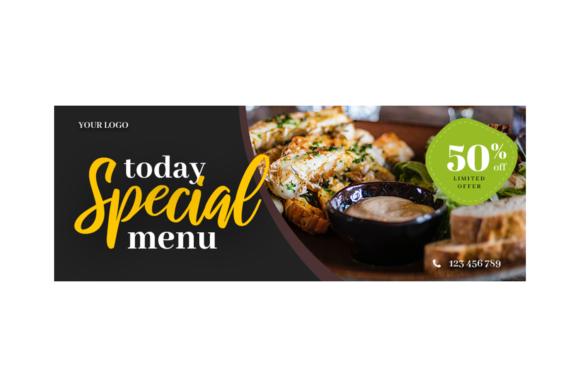
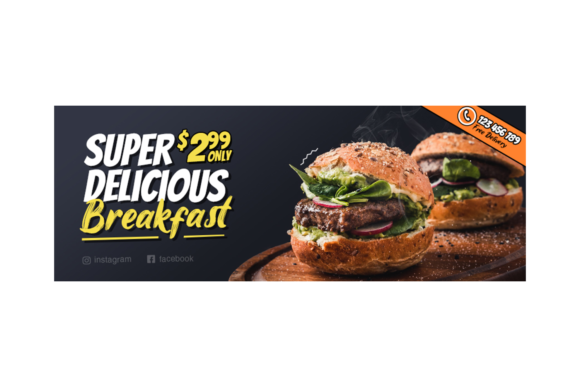
Whether you run a cozy local café, manage a food blog, or are simply promoting a morning wellness routine, having a professional header is crucial. The specific template we are discussing here is designed with precision. It comes in at 851×315 pixels, which is the exact standard dimension required by Facebook for cover photos on desktop and mobile devices. Using the correct size ensures your image never gets awkwardly cropped or stretched, maintaining a crisp and professional appearance across all screens.
Why Smart Object Replacement Changes Everything
The most intimidating part of editing design files for many people is the fear of breaking the layout. Traditional editing might require you to manually move text boxes, resize images, and guess at color codes. However, this template utilizes a feature known as Smart Object Replacement. This is a game-changer for beginners and busy professionals alike.
With smart objects, you do not need to worry about alignment or resolution. You simply open the specific layer in Adobe Photoshop (CS4 or higher), paste your own photo of pancakes, coffee, or a sunrise breakfast spread, save it, and watch as the main design updates automatically. The template handles the scaling, masking, and blending for you. This means you can swap out a summer menu for a winter special in seconds, keeping your page dynamic and relevant without starting from scratch every time.
Perfect Resolution for a Sharp First Impression
In the digital world, image quality speaks volumes about your attention to detail. A blurry or pixelated cover photo can unintentionally signal that a business is inactive or unprofessional. This template is built at 300dpi (dots per inch). While screen resolution typically requires less, designing at 300dpi ensures that every element remains sharp, even if Facebook compresses the image slightly during upload. It guarantees that the textures of your food photography look appetizing and the typography remains crisp and readable.
The high-resolution foundation also gives you flexibility. If you decide later that you want to use this same design for a website banner, a newsletter header, or even a printed flyer for your shop, the source file is robust enough to handle it. You are not locked into a low-quality web graphic; you own a high-fidelity asset.
Who Benefits Most From This Design?
The appeal of a Breakfast Template - Facebook Cover extends far beyond just restaurants. Consider the diverse range of creators who can leverage this tool:
- Food Bloggers and Influencers: If your content revolves around morning routines, healthy eating, or recipe sharing, this template provides an instant branding boost. It helps unify your visual identity so followers recognize your content instantly.
- Small Business Owners: Cafés, bakeries, and brunch spots can use this to announce daily specials, happy hours, or new menu items. The organized layers make it easy for a staff member with basic computer skills to update the promo.
- Wellness Coaches and Educators: For those promoting morning yoga, meditation, or productivity hacks, the "breakfast" theme serves as a perfect metaphor for starting the day right. You can replace the food imagery with calming morning scenes while keeping the elegant layout.
- Freelance Marketers: If you manage social media accounts for multiple clients in the hospitality sector, having an editable PSD file allows you to deliver high-quality assets quickly, improving your turnaround time and client satisfaction.
Understanding the File Structure and Organization
One of the hidden strengths of this resource is its internal organization. When you download the package, you aren't just getting a flat image; you are receiving a fully layered PSD file. Inside, the layers are logically named and grouped. You will find separate folders for the background, the main image placeholder, text elements, and decorative overlays.
This organization is vital for customization. Perhaps you love the layout but want to change the font color to match your brand's specific hex code. Because the layers are separated, you can click on the text layer and type your own headline without disturbing the rest of the design. Want to remove a decorative ribbon or icon? Simply toggle the visibility of that specific layer off. This level of control empowers you to make the template truly yours rather than forcing you to accept a rigid, one-size-fits-all look.
What Is Included in the Download?
When you acquire this template, transparency is key regarding what you receive. The package typically includes three main components to ensure you have everything needed for a smooth workflow:
- The PSD File: This is the master file compatible with Adobe Photoshop CS4 or higher. It contains all the editable elements and smart objects ready for your content.
- A Preview JPG File: This allows you to see exactly what the final design looks like before you even open Photoshop. It is useful for quick reference or showing a client the concept.
- A Read Me.txt File: Often overlooked, this document is essential. It usually contains instructions on how to access the smart objects, font recommendations, and troubleshooting tips if you encounter any issues during editing.
It is important to note a common distinction in template purchases: the images shown in the preview are for demonstration purposes only. They are not included in the final download due to licensing restrictions. This is standard industry practice. The value lies in the structure and design framework, allowing you to insert your own original photography or royalty-free stock images that you have the rights to use. This actually benefits you, as it ensures your social media presence features unique content that belongs specifically to your brand.
Practical Tips for Getting Started
If you are new to using PSD templates, the process might seem daunting at first, but it is quite logical. Start by ensuring you have a compatible version of Photoshop installed. Once you open the file, look for layers marked with a small icon indicating a smart object. Double-clicking these thumbnails will open a separate window where you can paste your image. After saving that window, return to the main file to see the update.
Before finalizing your cover, always preview how it looks on both desktop and mobile views. Facebook crops cover photos differently depending on the device. Since this template is already sized at 851×315 pixels, it adheres to the safe zones, but it is still wise to keep critical text and logos toward the center of the composition to ensure they are never cut off on smaller smartphone screens.
Investing in a well-structured Breakfast Template - Facebook Cover saves you time, money, and creative stress. It bridges the gap between amateur snapshots and professional branding, giving you the tools to present your best face to the world every single morning. Whether you are launching a new product or just refreshing your page for the new season, this editable resource puts professional design capabilities directly at your fingertips.